Access and navigate the Numonis platform
Sign in, choose your organization, and find the main platform sections.
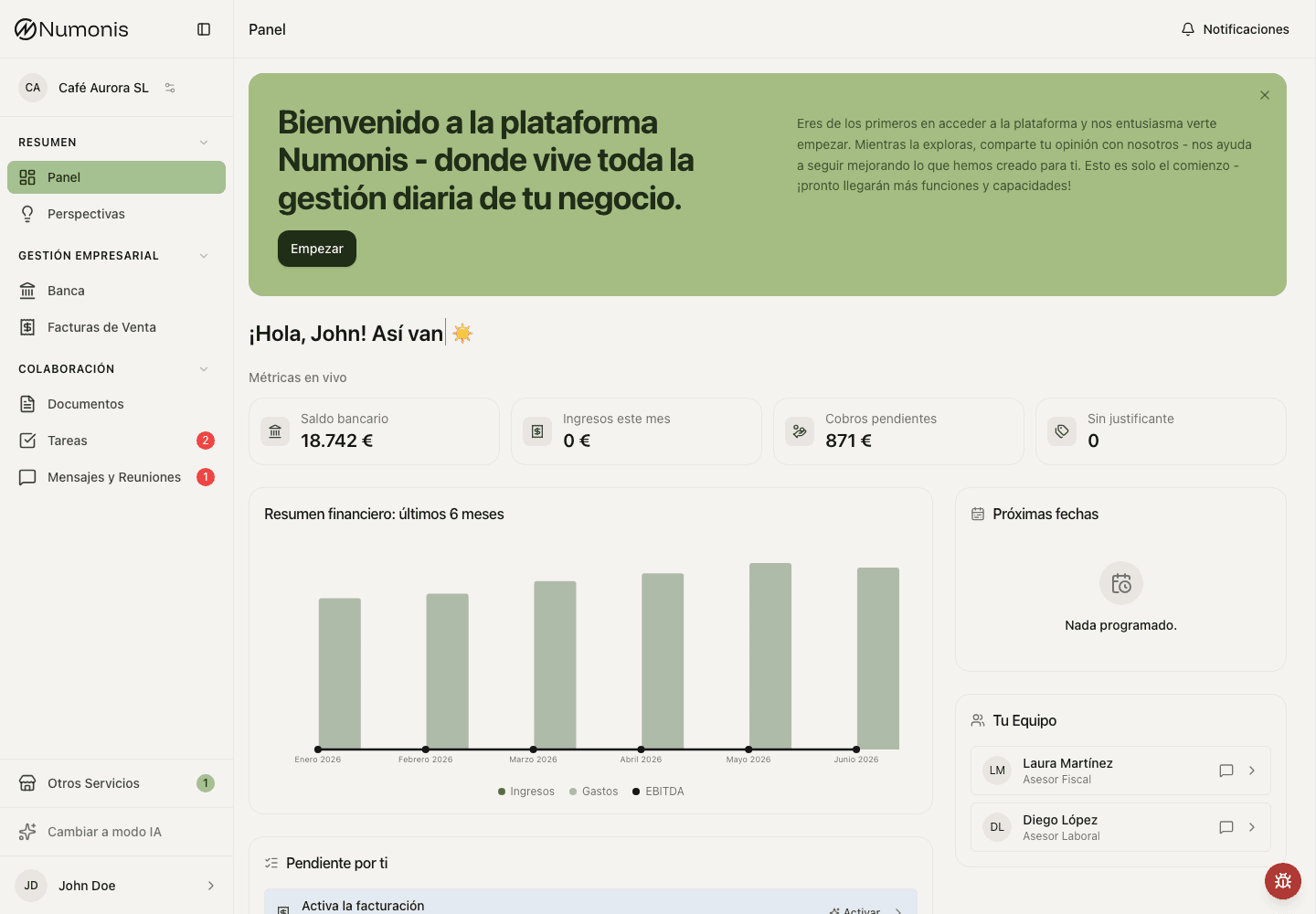
On desktop, use the sidebar to move between dashboard, documents, banking, invoices, tasks, messages, and settings.
The Numonis platform is organized by sections. Each section supports a specific part of your work with the Numonis team: documents, banking, sales invoices, tasks, messages, reports, and settings.
On desktop, the sidebar shows the main platform sections. On mobile, the bottom navigation shows the most-used shortcuts and the More menu contains the rest.
How to sign in
If your account was just created, open the invitation email from Numonis and use the Set your password button to choose your password before signing in for the first time.
- Open the Numonis platform in your browser at
app.numonis.com. - Enter your email and password.
- Check your registered email for the 6-digit verification code.
- Enter the verification code and sign in.
- The first time you sign in, read the platform terms and conditions and accept them to continue. The terms show in Spanish by default — use the language selector above the document to read them in English. Scroll to the end of the document to unlock the accept option. This is a one-time step. If the terms change later, the platform shows a notice that you can close — your access is not blocked, and continued use of the platform for 30 days counts as acceptance of the updated terms. You can view the latest terms at any time at
app.numonis.com/terms. - If you manage several organizations, select the correct organization before reviewing data or uploading documents.
If you request another code, use the newest email for that step. Earlier codes for the same step stop working. Each code can be used once; signing in does not cancel a separate password-reset code.
Connect and switch accounts
You can connect client and team accounts in the same browser and switch between them without logging out. Sign in separately to each account; connecting accounts does not combine their permissions.
- Sign in with the email of one of your companies.
- Open your profile at the bottom of the sidebar. On mobile, open More and tap your profile at the bottom.
- Select Connect more accounts.
- Enter the email and password of your other account, then the 6-digit verification code sent to that email. For a team account, you can also select Continue with Microsoft and choose your Microsoft account.
- Numonis opens your other account. The profile menu shows the active user's photo, name and email, with a checkmark and an Active label when other accounts are connected. Under Other accounts, select another email to switch accounts. Team account identifies an operator account and opens its team portal. A client account opens its last-used company in this browser session; if that company is no longer available, Numonis opens another company you can access.
With one connected account, the sidebar button shows your photo and name. Its menu contains your email, Profile settings, Connect more accounts and Log out. If you have not uploaded a photo, or it cannot load, Numonis shows your initials.
In the client portal, the company menu at the top of the sidebar also groups linked client companies by email. Use it to jump directly to a specific company. Team accounts are switched from the profile menu. Switching accounts also updates other tabs open in the same browser.
If you have not accepted the terms and conditions with one of your emails yet, the terms screen also lists your other signed-in emails. Select one to switch to that account. You can accept the terms for the first email later.
Notifications belong to the active email and are not merged with your other accounts. Switch emails to see that account’s notifications.
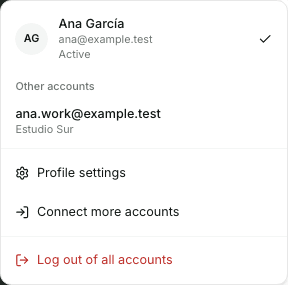
Your profile menu shows the active email and lets you switch accounts.
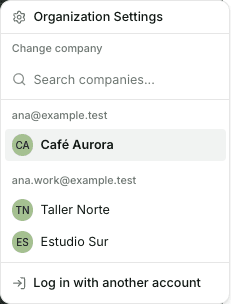
The company menu groups your companies by the email that you use for each one.
When you log out, Numonis logs out every email that is open in that browser. The next time you sign in, log in with your other account again. Numonis also asks you to log in again if you do not use it for 30 days or if its password changes.
Main platform sections
- Use Dashboard to see alerts, metrics, and next steps.
- Use Banking to connect bank accounts, review transactions, and link documents.
- Use Sales invoices to configure invoicing, create documents, and manage customers and items.
- Use Documents to upload invoices, receipts, statements, contracts, and other supporting documents.
- Use Tasks to respond to concrete requests from your accountant, payroll specialist, or Numonis support.
- Use Communication to open conversations with the Numonis team.
- Use Other Services to request support for needs outside accounting and payroll.
Where settings are
There are two settings areas:
- Profile settings: your user account, profile photo, language, time zone, appearance, font size, and notifications.
- Organization settings: business details, logo, primary contact, and team access for the selected organization.
The platform Terms & Conditions are always available from the link on the sign-in page — no sign-in required. Inside the platform, open the Help menu at the top right to find the latest terms with their version number and last-updated date.
On desktop, open your profile at the bottom of the sidebar and select Profile settings. Use organization settings for business details and team access. On mobile, open More, tap your profile at the bottom of the menu, then select Profile settings.
Tips
- Always check the active organization before uploading files or issuing an invoice.
- On mobile, use Documents and Communication from the bottom navigation for the most common workflows.
- If you do not see a section, check the More menu or contact Numonis from Communication.
Related articles
Using the Numonis platform
Practical guides for using the Numonis platform as a client: documents, invoices, banking, tasks, messages, reports, and settings.
Use the Numonis platform on mobile or as a PWA
Install the Numonis platform on your home screen, navigate on mobile, and upload documents from your phone.