Upload documents
Upload invoices, receipts, bank statements, and files so Numonis and your accountant can review them.
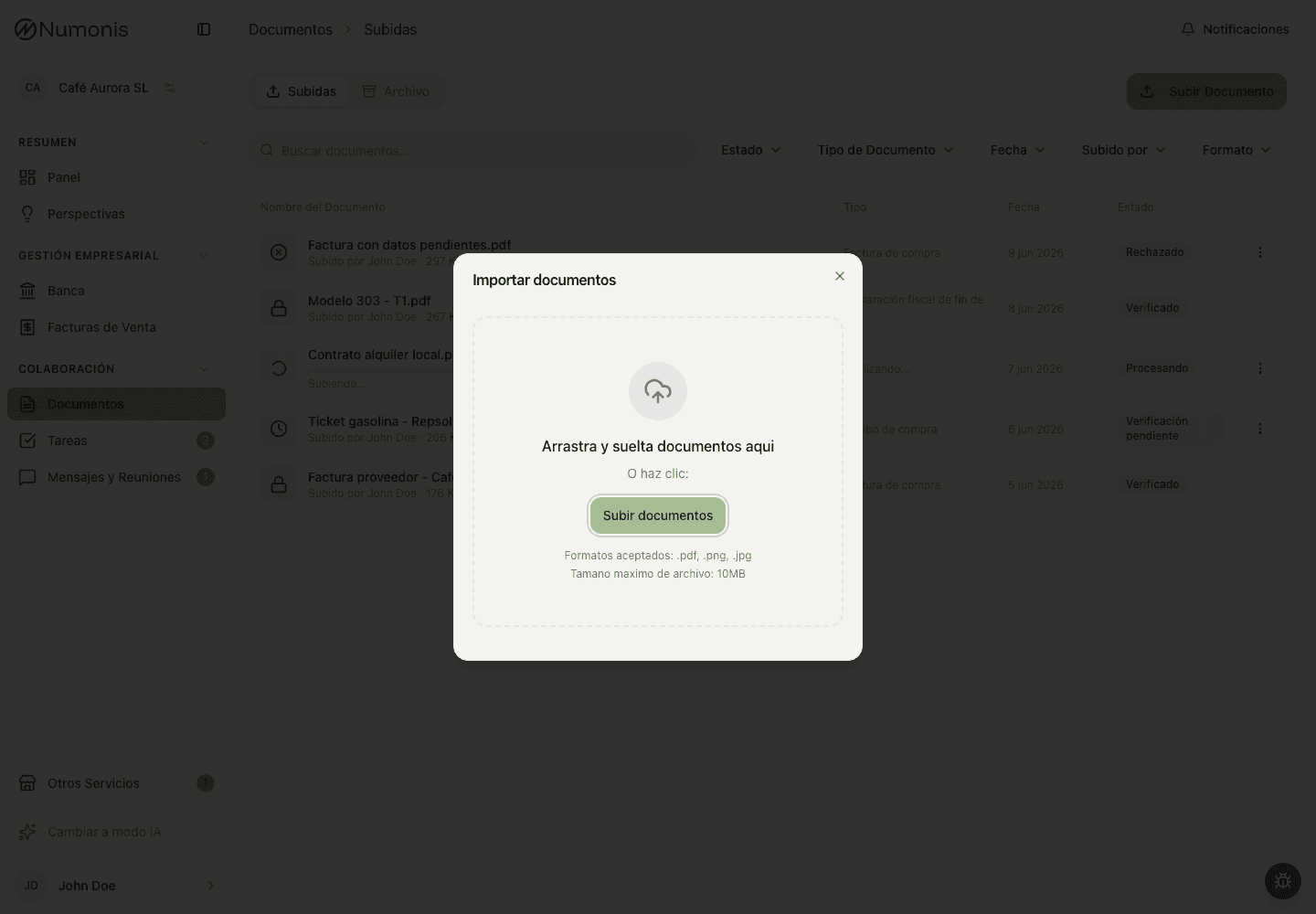
From Documents, drag files anywhere on the upload screen or press Upload to select them from your device.
Document upload is how you send files to the Numonis platform for accounting review. Upload documents when they explain business income, expenses, payments, collections, or a request from your accountant.
What this is
The Documents section stores files that Numonis and your accountant use to classify, review, and close your accounts. A document can be a supplier invoice, receipt, ticket, contract, payroll file, official letter, bank statement, or any other file requested through a task or message.
Files uploaded here are separate from bank transactions. If a bank transaction needs a document, upload the file first and then link it from Banking when the action is available.
Before you upload
Check that the document is legible and includes the important details: supplier, date, amount, VAT if applicable, and expense description.
How to get there
- In the sidebar, press Documents.
- On mobile, press Documents in the bottom navigation.
How to upload files
- For a normal upload, press Upload.
- Drag files anywhere on the upload screen or press to select them.
- Check that all files appear before confirming.
- Press Upload to confirm.
- Wait for Numonis to confirm the upload. Numonis classifies each file automatically.
Dragging files onto Documents also uses automatic classification, including inside archive folders.
Import historical sales invoices
- Open Archive → Accounting Documents → Sales Invoices.
- Press Import sales invoices.
- Select only sales invoices issued before you started invoicing on Numonis.
- Press Upload. All files in this import are filed as sales invoices in Documents.
On mobile, you can upload a photo directly from your phone. Take the photo in good light and make sure the full document is visible. Numonis saves iPhone photos in HEIC format as JPG files.
After uploading a document
Numonis processes the file. The status may appear as Processing, Pending, Verified, Rejected, or Duplicate. If information is missing, your accountant may leave a note, assign a task, or write to you through Communication.
Before processing starts, a file can show In queue. Numonis gives companies turns so a large upload does not keep every other company waiting for the whole batch.
Keep the platform open until Numonis confirms that your upload has finished. After confirmation, your files are saved and processing continues in the background. You can use another section or close Numonis and return later.
Short waits show no extra notice. If processing takes a while, a dismissible message explains that it can take a few minutes. A longer delay uses different wording without promising a completion time. Processing does not replace your accountant's review.
If a PDF contains several invoices, or combines invoices with other business documents, Numonis groups their pages and processes each part separately. PDFs without invoices or receipts stay together. Blank scanner backs stay with an adjacent document. A blank cover does not prevent processing when the PDF contains readable pages. Review the resulting parts to check that each document is complete and correctly classified.
If the file cannot be divided completely, the original remains available with a processing error. Upload the documents as separate files when the combined file continues to fail. A single file can be divided into at most 20 documents.
If several invoices remain together in one PDF part, including receipts scanned onto one page, the file stays pending with a review note. Numonis keeps the original and stops invoice extraction for that part. Split the file or upload each invoice separately. Keep all pages of each individual invoice together.
Large PDFs are prepared automatically without reducing image quality or dropping pages. If a file exceeds an automatic processing limit, its original remains available with an Automatic Processing Limit message. Upload smaller files while keeping each complete invoice together, or contact your accountant. Repeatedly retrying the same oversized file will not resolve the limit.
Automatic filenames
Your file keeps the name you gave it. An iPhone HEIC photo keeps its name with the .jpg extension. You see that name in Documents, in downloads, in Chat AI and in the tickets you open from a document. Your accountant works with a system name. Documents that your accountant uploads show the system name to everyone. Once processing finishes, new invoices and identifiable tax filings receive a system name based on their contents:
- Invoices: supplier name, supplier tax ID, invoice number and invoice date (
YYYY-MM-DD). Example:Proveedor-B06267306-A2600354-2026-09-14.pdf. - Tax filings: taxpayer tax ID, model, and period followed by the fiscal year. Example:
B06267306-303-1T2026.pdf. Quarters use1T–4T, months use01–12, annual filings use0A, and the instalment payments of models 202 and 222 use1P–3P.
Tax filenames use the taxpayer's ID printed on the document even when it differs from the company's tax ID. A mismatch shows Needs your review, as it does for invoices, and the document stays pending verification. Your accountant decides whether to approve it; an automatic name does not approve it.
The file contents and format stay the same. Each invoice separated from a combined PDF receives its own system name after processing.
If the required details are missing or ambiguous, the system name stays equal to your file name. Tax files containing several different filings also keep their name. Other document types and documents uploaded before this feature keep their existing names.
You can rename a document at any time. The new name replaces the name you see, and later processing does not change it. Your accountant can rename the system name; the name you see stays the same. Correcting invoice details updates an automatic system name. Replacing a file through re-upload starts again with the replacement file's name and contents. A document that is linked to a bank transaction cannot be re-uploaded. Unlink it in Banking first.
Your accountant sees your file name in the document details as Original file name when it differs from the system name.
Common problems
The document is not clear
Upload a higher-resolution version or take the photo again with good lighting.
I do not know whether a receipt is enough
If you have a full invoice, upload the invoice. If you only have a receipt, upload it anyway and your accountant will tell you if more information is needed.
The file is password-protected
Numonis cannot read PDFs or ZIP files that require a password. Remove the password first — for example, open the PDF with its password and save or print an unprotected copy — and upload the file again.
The file was already uploaded
If you upload a file that is identical to one already in your organization, Numonis skips it and tells you which file was a duplicate. Nothing is lost — the original document is already there. If you meant to replace a rejected document with a corrected version, use the re-upload option on that document instead.