Review document status and archive
Filter documents, review their status, and use the archive to find documents from previous periods.
The archive groups documents by date so you can return to supporting documents from previous closings.
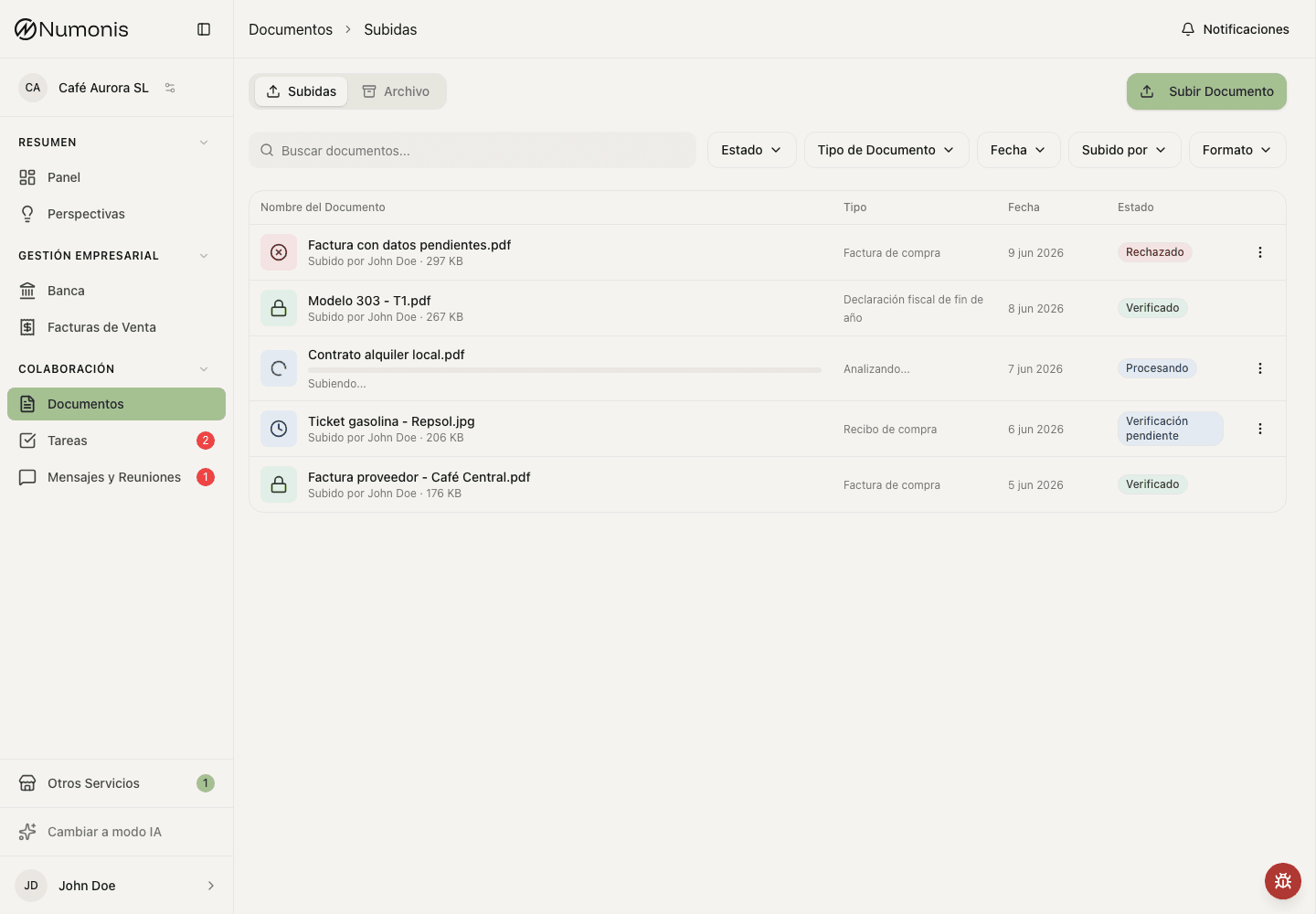
The Documents view shows uploaded files and their accounting status. Use it to understand whether a document is still being processed, needs attention, has been reviewed, or is stored for a previous period.
How to review recent documents
- Open Documents.
- Use the main list to see recent documents.
- Type in the search box if you know the supplier, amount, or file name.
- Filter by status if you only want to see pending or rejected documents.
- Press a document to open its detail.
How to download several documents (operators)
- Open Documents → Uploads for the company.
- Select documents with the row checkboxes, or use Select all for the currently loaded, filtered list. Scroll to load more documents before selecting all if needed.
- Press Download in the bulk actions bar.
- Save
documents.zipand extract it to access the files in their original formats.
You can download up to 100 documents, with a combined size of 200 MB, per batch. Files with the same name receive a number so each file is kept. Downloading keeps your selection and does not accept, reject, or mark documents as exported.
If a selected document is missing, blocked, or awaiting its security scan, the download fails without producing a partial ZIP. Adjust the selection or try again later.
How to use the archive
- Open Documents.
- Press the Archive tab.
- Search or filter from the Archive root to find a document across the full archive.
- Select a folder to browse by category. Search and filters then stay within that folder.
- Select the year and month when the folder uses accounting periods.
- Open the document you want to check.
Tax folders
Open Taxes → year → Model to find declarations and tax payment documents. For example, Taxes → 2026 → Model 303 contains documents with a fiscal date in 2026 linked to model 303. The year comes from the document's Fiscal date, which your accountant can correct. A return with a verified declared period appears under the year of that period. New documents get the last day of the period as their fiscal date. For example, a 4T 2025 return submitted on 22 January 2026 appears under 2025. If Numonis cannot verify the period of a recognized AEAT submission receipt, it uses the submission date printed after Presentación realizada el.
Numonis checks that the receipt's justificante number belongs to the printed model. If the submission cover cannot be read reliably, Numonis keeps the existing model and requests review. Tax documents without a submission cover skip this check. In both cases, the fiscal date still moves to the last day of the declared period when Numonis can verify that period. Your accountant can correct the fiscal date and model. Updates to automatic extraction preserve earlier mapped metadata and manual corrections.
Folders appear automatically when they contain archived documents. Counts include verified, rejected, and duplicate files. Documents awaiting review remain in Uploads. Files without a fiscal date appear under No fiscal date; files without a linked model appear under No model. Older files stay available in these folders until your accountant assigns their metadata.
Use the breadcrumb or Back to go up one level. Search and filters stay within the current tax folder, year, or model. Tax payment slips and proofs appear in Taxes.
How to rename a document
Scanned files often arrive with generic names such as scan_0001.pdf. A clear name makes the document easy to find later.
- Open Documents.
- Press the ⋮ menu on the document and select Rename.
- Type the new name. The file extension does not change.
- If Numonis knows the supplier, press the suggested name to use it.
- Press Save changes.
You can rename the documents you uploaded. Organization administrators can also rename documents that arrived by email. Your new name replaces the name you see. Your accountant keeps the system name and sees your name in the document details.
What each status means
- Processing: Numonis is reading the file.
- Pending: review, confirmation, or more information is missing.
- Verified: the document has been reviewed.
- Failed: the file could not be processed — correct it and upload it again. Files where malware is detected fail automatically and are blocked from download; contact your accountant if you believe this is a mistake.
- Rejected: there is a problem you need to correct.
- Duplicate: Numonis detected that the file already exists.
Some bank statements need a check by your accountant before their transactions appear in Banking, for example because their balances do not add up. Such a statement stays Pending and shows a warning icon next to its name. Move the pointer over the icon, or open the statement, to see the reason.
Tax documents require review if Numonis cannot verify the declarant's tax ID, model, fiscal year or period, if the tax ID differs from your organization's tax ID, or if the filing model conflicts with its submission cover. A manual filename does not disable these checks. If a later read is uncertain, an earlier taxpayer mismatch warning stays visible.
Numonis blocks identical file uploads within your organization, including simultaneous uploads. For newly processed AEAT receipts, another PDF or scan of the same document kind with the same verified declarant NIF and submission justificante is marked Duplicate and linked to the existing document. A declaration, a payment slip and a payment proof remain separate kinds. If two documents have the same taxpayer, model, fiscal year and period but a different reference or kind, Numonis asks for review: one may be a correction or a separate payment proof. Historical files without this verified reference may also require manual comparison.
Long tax documents are checked in consecutive sections. If the full filing cannot be verified, the document stays Pending with a review warning.
For a document marked Duplicate, open its detail and use the Eye control to compare this upload with the existing document. Each preview has its own zoom, scroll and PDF rotation controls. The comparison fills the screen and places the previews side by side on desktop or one above the other on a phone. You can also follow the link to open the existing document.
When an operator corrects an invoice and its number, supplier, date and amount match an existing invoice, Numonis stops the save and links to the existing document. Follow that link to review the existing file.
If the new document is redundant, use its normal Delete action; deletion removes that document, its file and its imported invoice. A document that is linked to a bank transaction cannot be deleted. Unlink it from the transaction in Banking first. For a bank statement, deletion also removes its transactions from Banking, together with their notes and their links to documents. The linked documents stay. If your connected bank also shows the transactions of the statement, the statement cannot be deleted. If your accountant already works on its transactions, ask your accountant to delete the statement. After you delete, the app moves to the next document in your current list (loading the next page if needed), or the previous one if you were at the end. It returns to the documents list if no neighbor is available.
If the status does not make sense, open the document detail first. If you still need help, write through Communication and include the document name.