Review and reconcile bank transactions
Filter bank transactions, open details, and link documents from the transaction detail.
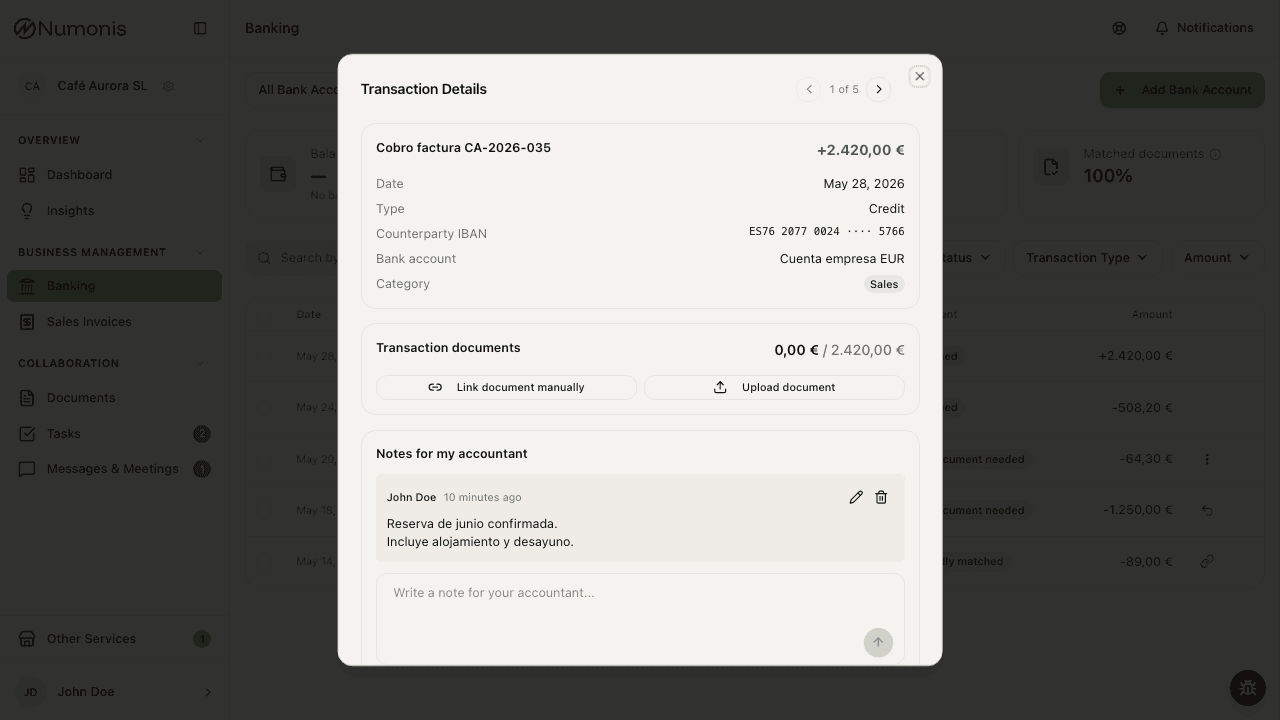
The transaction detail shows the movement and its documents, followed by a note composer for your accountant.
The transaction list helps you see which income and expenses are already linked to documents and which need attention before your accountant can finish review.
How to review transactions
- Open Banking.
- Select the bank account if you have more than one.
- Change the period from the date selector.
- Use search to find supplier, customer, or description. You can also search by amount, with or without thousands separators (for example
1573,97or1.573,97) — a whole number like2000finds any transaction of 2,000-and-something euros, in or out. - Filter by income, expenses, document status, or an amount range (minimum, maximum, or both).
- Press a transaction to open its detail.
Each transaction shows its bank and the last four characters of its IBAN below the description. Credit cards show the last four card digits instead. This indicator is visible on desktop and mobile, including when you filter by account. If the account has no identifier, only its bank or account name appears.
The Balance card shows the account balance. When you select a past period, it shows the balance at the end of that period. Most banks report a balance with every transaction and Numonis uses it directly. Some banks do not — there Numonis reconstructs the period-end balance from the current balance and the complete movement history, and shows it only while that history fully reconciles with the bank. If the balance cannot be determined reliably, the card shows No balance data for this period.
Recognized companies
Transaction details can show Recognized companies below the category. Kontomatik identifies these names automatically when the bank connection includes this service. A transaction may show several companies, such as a merchant and a Payment processor. Hover over a name or focus it with the keyboard to see its source labels.
These names supplement the original bank description. Numonis uses them to rank invoice suggestions and to suggest a match when the amounts differ slightly. A payment processor does not identify the invoice supplier, and company recognition alone never authorizes an automatic link. Your accountant can review and accept the suggestion.
The row is hidden when no companies were recognized. Synchronization can update recognition on existing transactions when the movement is identified unambiguously. Transactions imported only from an uploaded statement may have no recognition data.
When recognition changes, Numonis recalculates suggestions for transactions that still need reconciliation. If processing is interrupted, it retries automatically during a later scheduled check. Existing confirmed links and “No document needed” decisions are preserved.
How to leave a note for your accountant
Use a transaction note when the bank description does not explain the payment clearly or your accountant needs context that is not in the supporting document:
- Open the transaction detail.
- Write in Notes for my accountant.
- Press Enter to send. Use Shift+Enter to start a new line.
You can add several notes and edit or delete any note you wrote. Your notes stay editable after the transaction is matched or marked as not requiring a document.
Your accountant sees the thread in chronological order but cannot change it. A message icon beside the transaction in their desktop and mobile lists tells them that a client note is available.
What document status means
-
Matched: the transaction is linked to an invoice or document.
-
Partially matched: there is a partial match and information may be missing. If the paid amount is slightly different from the invoice — for example a payment of €0.01 less — your accountant can accept the difference and mark the transaction as matched.
A linked invoice shows how much of it is already matched and how much is still open. Those amounts count every payment that settles that invoice, so an invoice paid in instalments shows what is left after all of them. A leftover of €0.01 stays visible.
-
Missing: Numonis has not found the related document yet.
-
Suggested: Numonis proposes a document. In the detail you can Accept or Reject suggestion.
-
No document needed: you or your accountant marked that this transaction does not require supporting documentation. Transactions dated before you started working with Numonis also show this status automatically — nobody will chase documents for that history. Numonis also marks new bank fees and interest up to 150 € automatically when it imports them from your bank connection or from a statement, because the bank statement is enough proof. This includes a fee that the bank returns to you. Your accountant reviews a higher fee. Fees for services that carry VAT, such as securities custody, a card terminal rental or leasing, still need the bank's invoice and are not marked. If an automatic mark is wrong, open the transaction and choose Requires a supporting document.
-
No supporting document required?: Numonis detected a bank fee, tax, or similar charge that usually needs no supporting document. The detail explains why. Your accountant confirms it with one click. Until then, the transaction stays in the Missing filter.
How to link a document
There are two ways to match a document to a transaction:
- Open the transaction detail and choose Link document manually to select a document that already exists in Documents.
- Open the transaction detail and choose Upload document to upload a file directly from the transaction detail.
The document picker first shows documents that flow the same way as the transaction — sales invoices for money in, purchase invoices for money out. Other open documents follow below them with the Other direction label, so a search also finds them without an extra click. An invoice whose number or amount you type shows at the top, also from the other direction. A refund is the exception: money coming in also lists purchase invoices already matched or partly matched to the original charge, and money going out lists sales invoices in that same state. Linking the refund does not change how much of the invoice is paid. When the charge is larger than the invoice, for example because it includes a deposit that the supplier pays back, and the refund returns all of that extra part, the charge and the refund both show as matched. The charge shows the amount that the refund returned. The invoice detail shows the refund as a linked movement with zero allocated to the invoice, even if the charge has not been linked yet. For credit notes already matched in full or in part, refund selection follows the correction direction. A corrective invoice with a negative amount shows with the refund it explains: money coming in lists the corrective invoices of your suppliers, and money going out lists the corrective invoices you issued to customers. Linking the refund settles that corrective invoice. An invoice from the other direction, for example a supplier invoice that the charge is not linked to yet, shows with the Other direction label. If you select it, the picker warns you before you link it. If you link a refund to it, the invoice keeps its paid amount. You can also search by part of the invoice number or file name, by supplier or customer, or by amount, with a comma or a dot and with or without thousands separators (for example 22,12, 22.12 or 1.573,97).
If you do not know which document matches a transaction, contact your accountant through Communication and include the bank account, date, amount, and counterparty.
How to mark that no document is needed
Some transactions have no supporting document — bank fees, taxes, payroll, or transfers between your own accounts. If you know a transaction needs no document:
- Open the transaction detail.
- Choose No supporting document required.
- Select the reason that fits best. If you choose Other reason, briefly describe it.
Your accountant sees the reason you selected, so they can finish the review without asking you for the document. If you marked a transaction by mistake, open it again and choose Requires a supporting document.
You can also mark several transactions at once:
- Select the transactions with the checkboxes in the list. A bar shows how many are selected and their total amount.
- Choose No document needed in the bar. The button includes how many selected transactions still need a document.
- Select one reason — it applies to the whole batch.
Only transactions that still miss a document get marked. The rest are skipped and listed afterward. The transactions stay selected after the action. To clear the selection, choose Clear in the bar.
How to export transactions for accounting
Operators can export a period from Banking. The Excel workbook includes:
- Asientos: one transaction per row, including its bank account and that account's balance after the transaction when supplied by the bank.
- Remesas: incoming batch collections matched to at least two customer invoices with assigned subaccounts. Each row shows the invoice, customer, subaccount, and collected amount.
Asientos also includes Concepto completo (the full stored bank description), Nombre contraparte (counterparty name), and IBAN contraparte (counterparty IBAN). These columns follow SALDO. The existing Concepto column keeps its shortened description. Missing bank details appear as blank cells.
Supplier payments, collections matched to a single invoice, and invoices without a customer subaccount are not included in Remesas.
To ask a client for missing documents, select Only transactions with missing documents in the export dialog. The file then includes only the transactions of the period with the Missing status. This option is selected by default when the list shows the Missing filter.
To export specific transactions, select them with the checkboxes in the list. Then choose Export in the bar. The file includes only the selected transactions, with one sheet for each bank.