Configure invoicing
Complete your business details, numbering, email, and payment methods before issuing invoices.
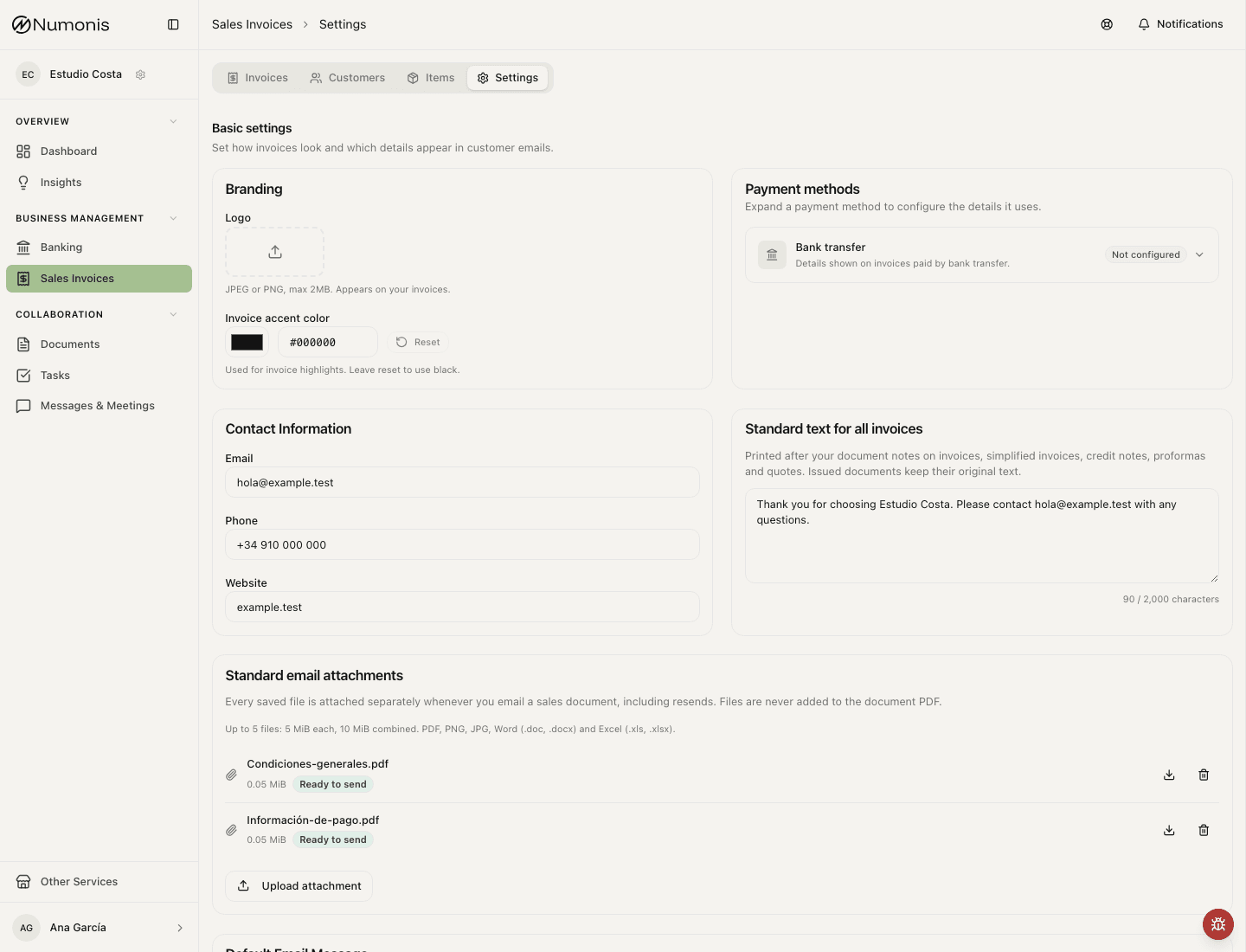
Settings group tax details, brand, payment methods, email templates, and numbering into tabs.
Screenshot recapture is pending for the tabbed settings layout.
Before issuing invoices, review your invoicing settings. These settings control what appears on the PDF, how invoice numbers are assigned, what email text customers receive, and whether certified invoicing is active.
An organization administrator or your accountant can change these settings and the certification setup. A member can open this page and read the values. A member cannot save changes, continue certification, or delete a sales document.
How to get there
- Open Sales Invoices.
- Press the Settings tab.
- Open Branding, Payment methods, Email, and Advanced. Review each tab before issuing the first invoice.
Tab selections stay in the URL, so browser Back and Forward return to the previous section. Valid pending changes to contact details, standard invoice text, bank details, default email message, and Commercial Registry data save when you leave the page or switch companies. A value with an error does not save, for example an email text over the limit, an invalid privacy URL, or an incomplete IBAN.
What each setting controls
- Certification (on Advanced): shows whether your account is not certified, pending, in review, active, or rejected. If VeriFactu or another certification option is available, this block is where you continue, retry, or review the setup.
- Business details: legal name, NIF/CIF, address, fiscal country, and legal representative. These details appear on issued documents.
- Branding: logo, color, contact details, and visual details used on invoice PDFs.
- Bank transfer: expand this method under Payment methods to edit the bank name, IBAN, BIC, and payment notes. These details appear on invoice PDFs only when the payment method is Bank transfer. Other payment methods hide them without removing the saved values. If you select bank transfer without an IBAN, Numonis warns you before issue and links directly to payment settings.
- Direct debit: when this capability is enabled for your organization, expand this method under Payment methods to turn on SEPA direct debit files and edit the creditor identifier, IBAN, and BIC. The creditor legal name comes from Business details, and the account is shared with Bank transfer. Turning file generation on makes Create direct debit file available whenever you select documents. A BIC is required only for legacy
pain.008.001.02XML; currentpain.008.001.08XML can omit it. C19.14 TXT can also omit it but requires a Spanish creditor IBAN. Your bank or payment provider can confirm the creditor identifier and format assigned to your organization.
If direct debits are not enabled for the organization, Numonis hides direct-debit setup and new actions. Previously saved mandates, SEPA settings, and direct-debit payment methods are retained as read-only history and return unchanged if the capability is enabled again.
- Email: default subject, subheading, and message used when you send invoices from Numonis. Turn on Use your business footer to add your organization footer to customer invoice, quote, and proforma emails. The structured editor reuses your saved logo, brand color, business identity, and contact details. Numonis group companies show the Numonis legal identity in this footer. Their own company name and address stay on the invoice. You can add an English and Spanish tagline, privacy-policy link, and legal text; choose whether to show the tax ID, address, phone, and Numonis attribution; and check the localized desktop or mobile preview. Organizations with the Numonis footer capability can instead choose the approved standard Numonis footer used by platform emails. Choose No footer to send these emails without a footer.
- Numbering (on Advanced): prefixes and next numbers for invoices, simplified invoices, corrective invoices, proformas, and quotes when those types are enabled. A custom series can be the automatic default for its document type. For a yearly series, choose the compact year format to produce numbers such as
A2601555from prefixAand sequence01555; the sequence resets in the next year.
Invoice PDF layout
PDFs display dates, currency, and payment details in aligned header columns. The logo is scaled to fit the header, with empty white or transparent margins removed from the PDF image.
Large JPEG logos are reduced before processing. PNG logos above 4 megapixels keep their original margins. Crop excess blank space before uploading these PNGs for better logo visibility.
Extra spacing separates the supplier and customer details, line items, and totals. The tax breakdown and totals use shaded tables, with the final amount highlighted.
Long invoices break between line items and repeat the table headings. Totals, notes, contact information, and bank details stay together with the last two items when the complete block fits on a page. Longer standard text can continue onto another page.
Standard text on every document
On the Branding tab, use Standard text for all invoices, beside Contact information, for wording that belongs on every sales document. The field accepts up to 2,000 characters and saves one second after you stop typing. Clear it to remove the setting. If saving fails, use Try again. Standard text (English) is printed on English documents; an empty English field keeps the Spanish text.
The text appears after document-specific Notes on invoices, simplified invoices, credit notes, proformas, and quotes. Line breaks are preserved. The builder shows it beside Notes with a link back to Settings. Draft previews use the current setting; confirmation stores the text with the document. Changing Settings does not rewrite issued documents or add text to historical documents.
Reusable email attachments
On the Email tab, in Standard email attachments, near the default email message, upload files to include whenever you email a sales document. You can save five files, up to 5 MiB each and 10 MiB in total. Supported formats are PDF, PNG, JPG/JPEG, DOC/DOCX, and XLS/XLSX.
Each row shows the filename, size, and scan status. Clean files can be downloaded. Wait for pending scans before sending, and remove blocked files. Remove a file here when it should no longer accompany future emails.
Every saved file is attached separately, after the generated document PDF. Files are not merged into the PDF and there is no per-send selection. Resending uses the current file list, while the text printed on an issued document stays as issued.
What to review before issuing
- Open Advanced and confirm the certification status.
- Confirm business legal details.
- Review Branding, Payment methods, and Email.
- Confirm numbering for every enabled document type.
- Save the changes.
Change certification
- Open Settings inside Sales Invoices.
- Open the Advanced tab.
- Find the certification block.
- Press Configure, Continue setup, or Retry if the action appears.
- Follow the guided setup until you return to the document list.
When to ask for help
Write to Numonis if you have questions about tax regime, VeriFactu, equivalence surcharge, IGIC, intra-Community VAT, or legal numbering.