Send and mark invoices
Review the invoice list, open detail, send by email, and mark payments.
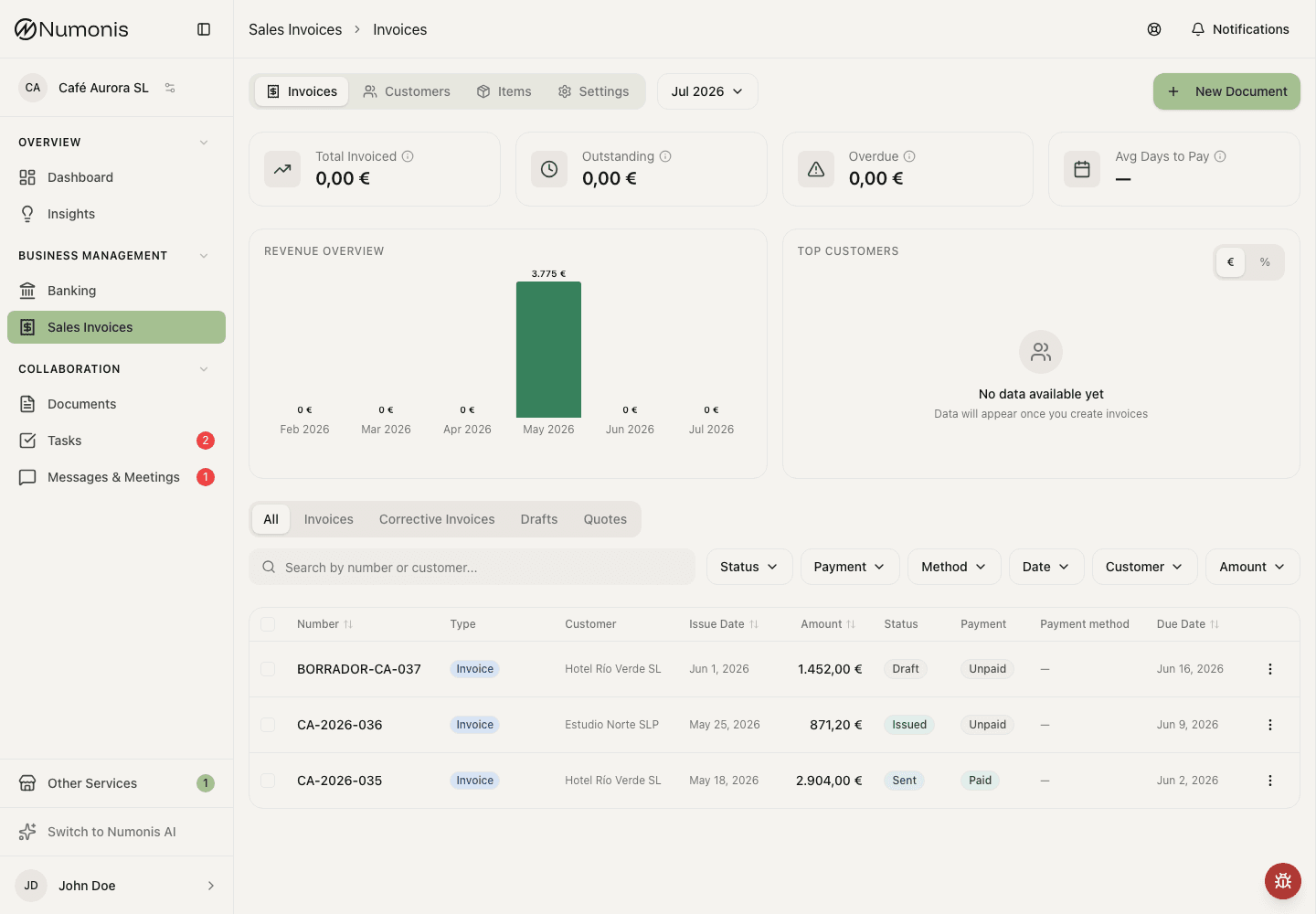
The list lets you filter documents, review amounts, and open quick actions.
The Invoices tab in Sales Invoices shows drafts, issued invoices, sent invoices, unpaid invoices, and paid invoices. From there you can open the detail and take action.
Only an organization administrator or your accountant can delete a sales document. Members do not see Delete.
The filters are Status, Payment, Method, Date, Customer, and Amount. Method uses the invoice payment method, for example Bank transfer or Direct debit. Search reads Search by number or customer...
When you select documents, the bulk action bar shows their combined total. Corrective invoices reduce the total instead of increasing it, and selections containing more than one currency show a separate total for each currency.
Your selection stays in place when you move between pages. To select more than the 20 documents shown on one page, use the select-all option above the list to select every matching invoice. Changing a filter or search clears the selection. After bulk Issue, the same invoices stay selected for the next action. With VeriFactu, wait until certification finishes and Send becomes available; Numonis refreshes the status of selected invoices on other pages too.
How to open an invoice
- Open Sales Invoices.
- Enter the Invoices tab.
- Use filters or search if there are many invoices.
- Press an invoice to see detail.
Files included with each email
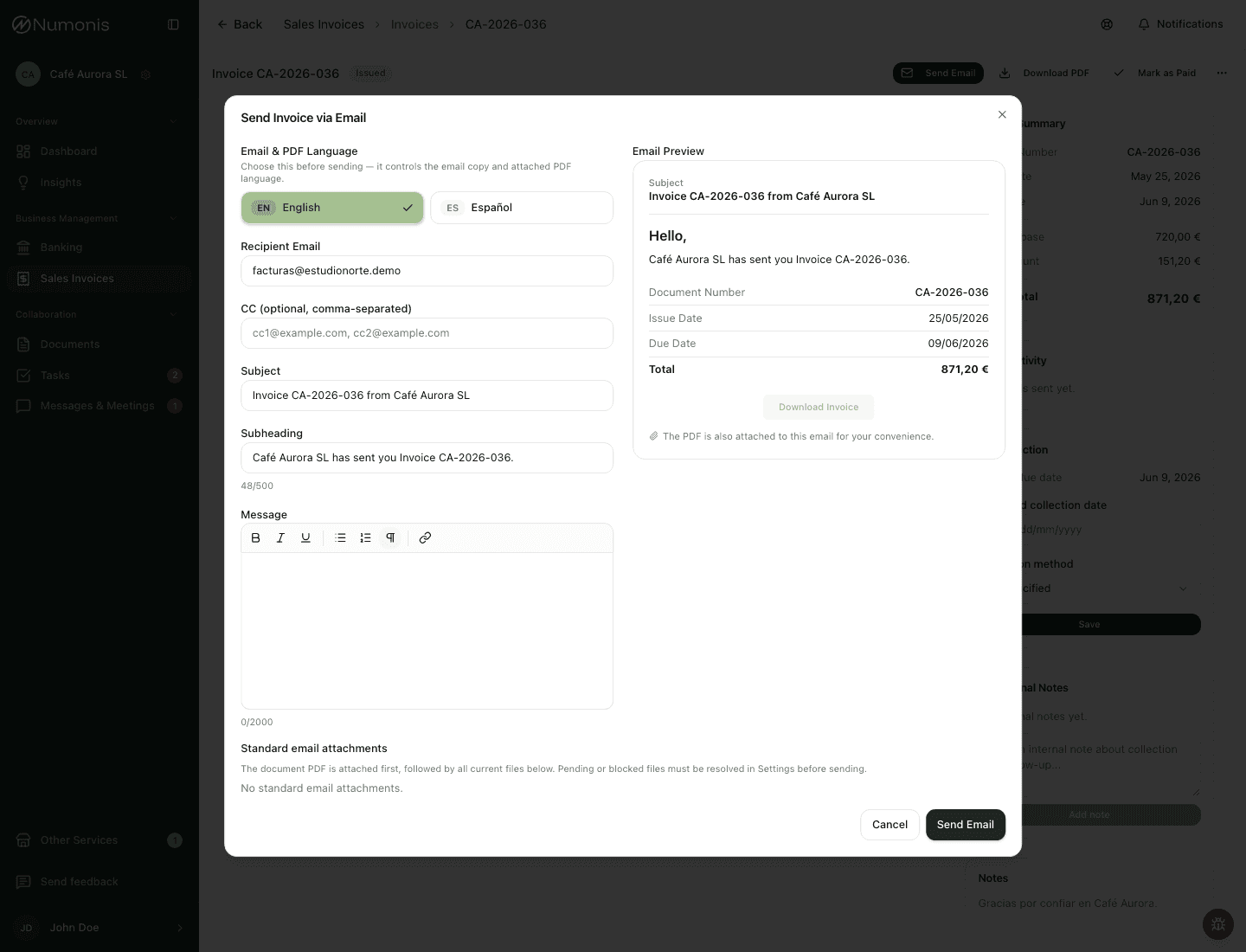
The Send dialog lists all files currently saved in Invoicing Settings. Every file is included automatically, including in bulk sends and resends. To change the list, add or remove files in Settings before sending. The document PDF is the first attachment; saved files remain separate.
Sending is blocked while any file is pending a scan or blocked. If a file cannot be downloaded, the email fails instead of silently leaving it out. The PDF and saved files together must fit within 25 MiB.
Each preparation attempt uses the current settings. An email that has already loaded a file may finish sending it after you remove it. Changes to standard text in Settings do not change the text on an issued document.
Issue several invoices reliably
Select drafts and press Issue. Numonis tracks each invoice separately and shows the number processed. Issuance does not send email automatically.
If the connection drops, the page reconnects to the same batch. Reloading the page in the same browser tab restores the batch and its selection for the same signed-in user and organization. Keep that tab open; do not start a second batch while the outcome is unknown.
At the end, the list, totals and selected invoice statuses refresh. Review any failed or skipped invoices; successful invoices stay selected for the next action. With VeriFactu, wait for certification before sending.
How to send a document
- Open an issued invoice, or a finalized quote or proforma.
- Press Send.
- Review recipient, CC, subject, and message.
- Confirm sending.
- Check email activity in the detail page.
The built-in email uses a neutral greeting, Hello,, and the preview shows the wording for the selected email language. Saved organization email text and edits made for one send still take precedence, so review the preview before sending.
If an invoice has the wrong address, verify the correct details with the customer, update the customer record, and edit an invoice that is still eligible for changes before resending it. Numonis does not infer a correct address from a postal code or change an invoice that was already sent.
When the customer is also a Numonis client, a matching Spanish tax ID links the billing customer to the client's account automatically. The Numonis team can review or adjust this link. After an invoice dated 1 September 2026 or later and issued by a Numonis group company is emailed, a copy is added to the customer's Documents review flow. The customer does not need to upload that PDF again.
If the accounts are linked after the email was sent, previously sent eligible invoices are added to Documents automatically. This does not send the emails again. A copy that was deleted from Documents is not added again.
Changing a client's tax ID clears existing delivery links so the Numonis team can check the new match.
Draft quotes and proformas must be finalized before Send appears.
If the customer has a saved second email address, it appears in CC automatically. You can edit or remove it before sending; this only affects the current send and does not change the customer's saved address.
How to send several invoices
- Open Sales Invoices and enter the Invoices tab.
- Select the invoices you want to send.
- Press Send in the bulk action bar.
- Review the confirmation and continue.
- If some invoices cannot be sent, review the summary. Numonis still sends the eligible invoices.
Bulk send uses each customer's saved primary email address and includes their optional second email address in CC. A customer still needs a primary email address for bulk sending. It uses the invoice language and your configured email templates, and is available for Issued and Certified invoices only.
Email recurring invoices
On the Recurring tab, a schedule can create drafts for review or issue invoices automatically. Review drafts must be issued and emailed manually. If automatic email is enabled, Numonis sends one email after each invoice is issued or certified, using the customer's current primary and optional second address and your current email defaults. It does not send payment reminders.
A missed scheduled date becomes a draft for review; it is not automatically issued or emailed later. Open the invoice from the schedule history to review it. If certification fails, the customer has no email address, or delivery is uncertain, the schedule history shows that attention is needed. Check the invoice and email activity before sending again; a manual send can fulfill a pending automatic email.
How to download several PDFs
- Open Sales Invoices and enter the Invoices tab.
- Select the documents you want to download.
- Press Download PDFs in the bulk action bar.
- Save the ZIP file when your browser asks.
Bulk PDF download is available for selected documents that already have a generated PDF. When you select several documents, Numonis downloads them together in one ZIP file. Drafts are skipped until invoices are issued or quotes and proformas are finalized.
How to create a SEPA direct-debit file
- In invoicing settings, review your creditor legal name under Business details. Open the Payment methods tab, expand Direct debit, turn on SEPA direct debit files, and save your creditor identifier and IBAN. Save a BIC too only if you will create legacy
pain.008.001.02XML files. - Add a complete direct debit mandate to each customer you plan to collect from. A file without the customer's mandate or debtor IBAN may be rejected and cannot reliably collect the payment.
- Set Direct debit as the payment method on each invoice.
- In Sales Invoices, open the Invoices tab and select all invoices for the collection.
- Press Create direct debit file.
- Choose
pain.008.001.08(the current default), legacypain.008.001.02, or the Spanish C19.14 TXT format, then select a collection date from tomorrow onward. - Press Create and download, then submit the downloaded file through your bank's usual channel.
The selected documents must all be positive EUR standard or simplified invoices in Issued, Certified, or Sent status, with an Unpaid or Overdue payment status and a current customer. Numonis validates the full selection before creating a file. If only some invoices are invalid, the dialog lists them and lets you create the file with the valid invoices; the listed invoices are excluded. Creditor-setting errors must be fixed before any file can be created.
Numonis always requires a debtor IBAN. An invoice whose customer has no IBAN is invalid and can only be excluded from the generated file; Create anyway cannot override it. If the debtor IBAN exists but no mandate is saved, Numonis shows a warning instead of excluding the invoice. Press Create anyway to include it with a recurring sequence and blank mandate reference, signature date, and BIC. This override applies to every available format, but the bank may still reject the record. An incomplete or invalid saved mandate remains an error and cannot be overridden.
While SEPA direct debit files is turned on, Create direct debit file is available for every non-empty document selection. Numonis checks the full selection only when you generate the file, so the action remains available even when one or more selected documents are ineligible.
In XML files, invoices for the same customer are combined into one debit transaction. Their amounts are added together, and their invoice numbers appear in the remittance information. Recurring and one-off mandates are placed in separate payment groups. C19.14 instead creates one fixed-width debit record per invoice, using an invoice-based debit reference. Choose C19.14 only if your bank accepts that Spanish flat-file format; it requires a Spanish creditor IBAN but does not require creditor or debtor BICs.
Creating the file does not mark invoices as paid or change any invoice state. Numonis does not record whether you submitted the file to your bank. A one-off mandate can therefore be downloaded more than once, so do not submit the same collection twice.
How to mark an invoice as paid
- Open the invoice.
- Press Mark as paid.
- Confirm the action.
- Check that the payment status changes to Paid.
How to mark several invoices as paid
- Open Sales Invoices and enter the Invoices tab.
- Select the invoices that have been collected.
- Press Mark paid in the bulk action bar.
- Confirm the action.
- Review any skipped invoices in the result summary.
Bulk mark paid is available for receivable invoices in Issued, Certified, or Sent status that are not already paid. Quotes, proformas, and decrease corrective invoices are skipped.
How to mark an invoice as unpaid
- Open the invoice.
- Press Mark as unpaid if the action appears.
- Confirm the action.
- Check that the payment status changes to Unpaid.
Actions that depend on status
- In Draft, you can edit and preview. Fiscal documents can be issued; quotes and proformas can be finalized.
- In selected Draft or Error fiscal documents, you can use bulk Issue. Quotes and proformas are skipped.
- In Issued, Certified, or Sent, you can download PDFs, send by email, and mark as paid when appropriate.
- In compatible invoices, you can create a corrective invoice.
- In compatible quotes or proformas, you can use Convert to Invoice after saving or finalizing.
- Finalized quotes and proformas can be edited in place until they are partially invoiced or closed. Editing does not create a new draft.
Create a direct debit file
When direct debit is enabled, the selection bar includes Create direct debit file.
- On the Invoices tab, select ordinary or simplified invoices that are issued, certified, or sent, in euros, with payment method Direct debit, and with a positive amount. A paid invoice is excluded.
- Press Create direct debit file.
- Choose the File format:
pain.008.001.08,pain.008.001.02, orC19.14 (TXT). - Set the Collection date.
- Press Create and download.
The file uses the SEPA Core scheme. Numonis does not mark the invoices as paid. A One-off mandate is not consumed by the download: do not submit the same one-off collection more than once.
If a customer has no mandate, the dialog says so. Fix it on the customer record or, when the notice allows it, create the file anyway. A debtor IBAN is still required. If an invoice cannot be included, the summary says how many are left out.
Creditor setup — legal name, SEPA identifier, IBAN, and BIC — is reviewed in Settings. If direct debit is not enabled for the organization, this action is hidden.
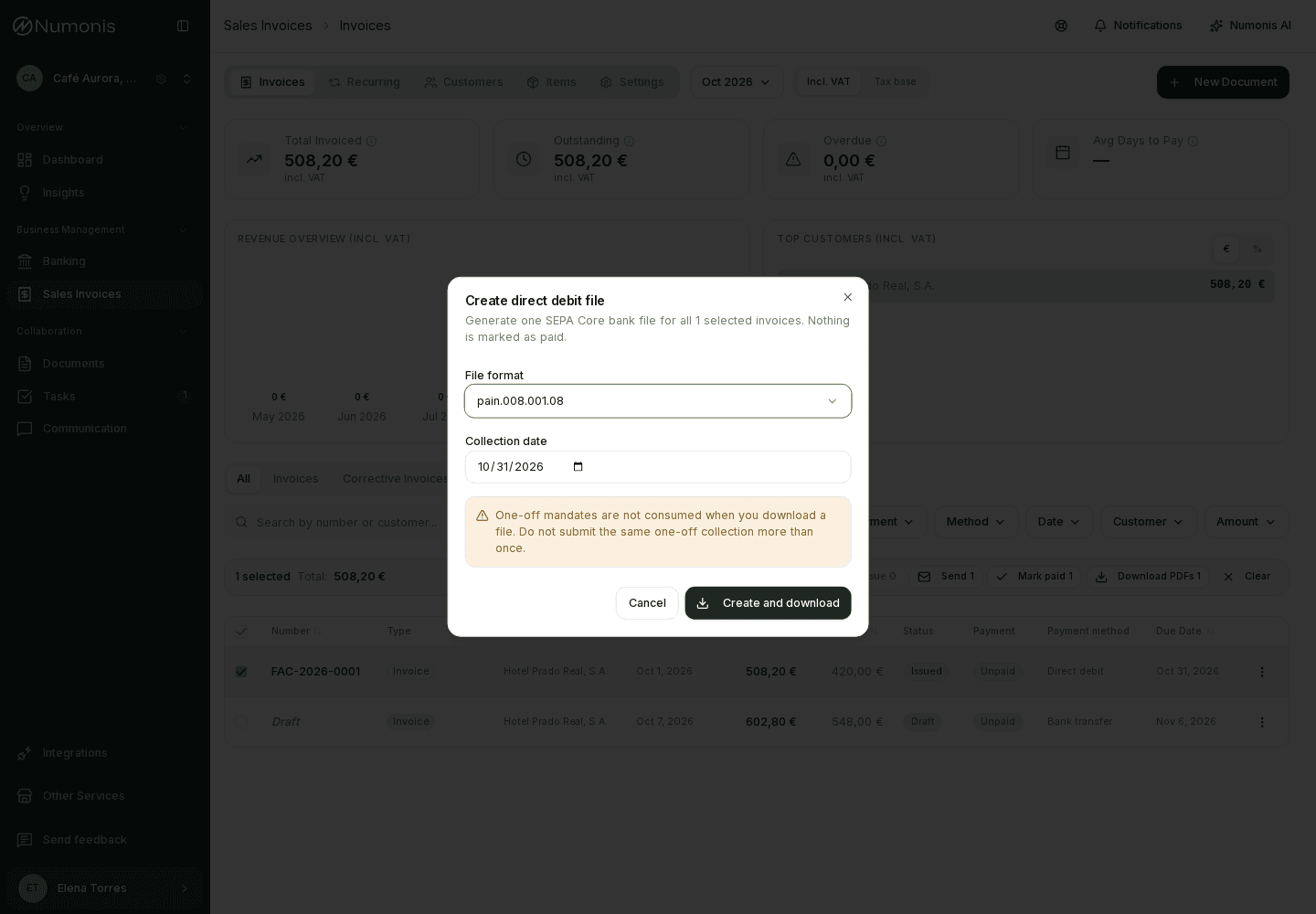
The dialog shows the format, the collection date, and the invoices included in the file.